This update includes the addition of NSF Fees to bills for counties that opt in and various quality of life updates.
Affected Pages
- Receive Payment
- Receipt Search
- Fees Report (New Page)
Affected Reports:
- PDF Receipt
- Receipt Report
- Fees Report (New Page)
NSF Fee Feature Overview
This update includes a major update to the voids and payment programs within the software. For counties that opt in, we enable you to collect NSF Check fees on top of the normal payments in the system.
When you run into a situation where there is a returned check from the bank, the normal procedure is to void the receipt from the system. Prior to this update, the collection of NSF fees were handled outside of the GSS system. This new feature allows you to add that fee at the time of the void to the bill. When the bill is brought up in the system at a later time for payment, the fee amount will be added to the total due for a bill.
This feature enables those that are opted in to credit card payments to collect those NSF fees online.
Applying Fees
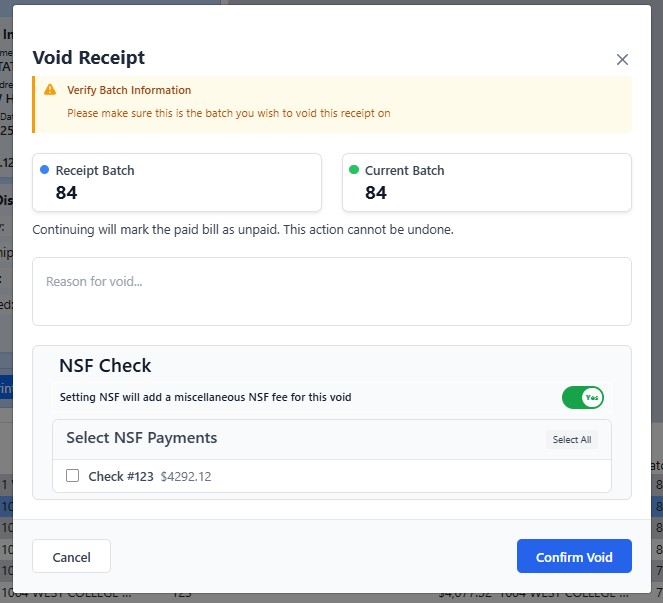
Below is the new void receipt dialog. When applying an NSF fee, you must set the NSF Check switch to "yes." From there, you can select which check you wish to apply the NSF fee to. Clicking Confirm Void will apply the void to the receipt and the fee to the bills affected.
Viewing Fees
Bill Search
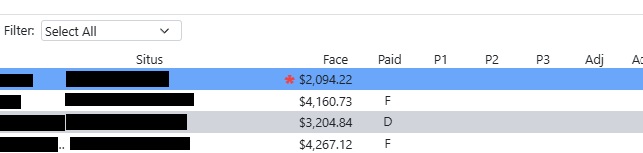
Fees can be seen in two places on the payments page. The first is the bottom search. When the bill is brought up in the bottom search, a red asterisk will be visible next to the face amount in the search box.
Tax Amounts Header
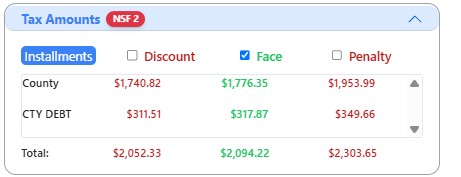
The second place is in the tax amounts section. There will be a badge next to the tax amounts header that displays the count of fees that are applied to a bill.
Enable/Disable Fees
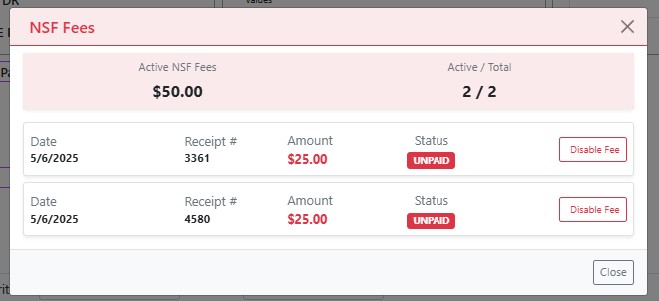
Clicking this badge will allow you to view the actual fees that are on the bill, as well as disable or enable the fees.
Maintaining Fee Amount
The fee amount can be updated from the maintain office hours page under the Cert Fee box.
Fees Report
There is also the addition of a fees report. This report will show you all of the fees based on the parameters that you pass in.